Controllers: The Ultimate Dingbats Font for Gaming & Tech Design
Every designer eventually hits a wall when trying to evoke a specific vibe. You are working on a project for a tech startup, a YouTube channel, or perhaps a local gaming tournament, and you need that specific "gamer" aesthetic, but standard vector icons feel generic. This is where Controllers enters the picture. It isn’t just another typeface; it is a highly specialized dingbats font designed to bridge the gap between typography and illustration. By containing a vast library of gaming consoles, controllers, and video game icons, it offers a creative shortcut for anyone in the digital space.
Visual Characteristics and Personality
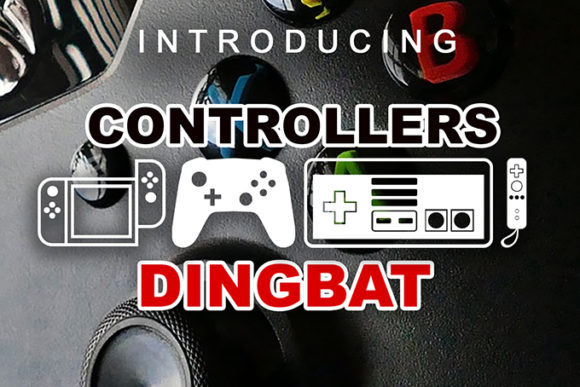
At first glance, Controllers might look like a standard text font in your dropdown menu, but the moment you type a letter, you unlock a library of detailed graphics. The visual style is distinct—leaning towards a line-art aesthetic that feels both modern and nostalgic. It captures the essence of retro gaming alongside current-gen hardware, making it a versatile design asset. Unlike a heavy display font or a flowing script font that dictates the mood of text, this typeface acts as a visual narrator. The personality of the font is playful yet technical, appealing to the 20-50 demographic who grew up with these consoles and now work in professional creative fields.
The icons included in the set are drawn with clean lines and consistent weight, ensuring they look professional when scaled. Whether you are looking for a classic joystick, a modern wireless gamepad, or specific buttons, the visual consistency is key. This makes it a premium font choice because it saves you the time of hunting for matching vector sets. It respects the visual language of the gaming community, using recognizable shapes that immediately communicate the subject matter without needing text explanation.
Practical Applications in Branding and Marketing
Understanding where to use Controllers is just as important as having it in your library. Because it is a creative font focused on imagery, its applications are broad across brand identity and marketing materials.
- Logo Design and Brand Identity: For a small business opening an esports arena or a retro arcade bar, Controllers provides immediate visual shorthand. You can use specific icons as part of a monogram or as secondary brand marks to build a cohesive identity system.
- Packaging Design: If you are selling custom console skins, controller thumb grips, or even snack foods targeted at gamers, the font can add thematic flair to your labels. It helps create a connection between the product and the lifestyle of the consumer.
- Digital and Web Design: On websites, these icons work perfectly as custom bullet points, section dividers, or background textures. They add personality to a web design without slowing down load times like heavy image files might.
- Social Media Graphics: Engagement on platforms like Instagram and TikTok often relies on visual recognition. Using Controllers in your social media graphics helps create a distinct aesthetic for a gaming influencer or a tech review channel, making posts instantly recognizable in a crowded feed.
For editorial design, such as a magazine feature on the history of gaming or a blog post about the best setups, these glyphs serve as excellent spot illustrations. They break up large blocks of text—whether that text is set in a serif font for long-form reading or a sans serif font for headlines—adding a layer of visual interest that keeps the reader scrolling.
Influence on Brand Perception and Audience Engagement
Typography and iconography are silent ambassadors for a brand. When you utilize a specialized asset like Controllers, you are signaling to your audience that you understand their interests. For the target audience of adults aged 20 to 50, gaming is often a significant part of their identity. Seeing accurate, well-designed representations of the hardware they love builds immediate trust and rapport.
This font influences visual hierarchy by allowing you to replace generic bullet points with thematic icons. This guides the reader's eye down the page, improving readability and flow. In terms of brand perception, using a commercial font like this elevates the production value of your work. It suggests that you have invested in quality modern typography and care about the details, which translates to a perception of professionalism.
Furthermore, consistency is vital in design. By using the same icon font across your website, merchandise, and presentations, you create a unified look. This repetition aids in brand recognition. When a follower sees a specific icon from the Controllers set, they should immediately associate it with your content.
Implementation and Best Practices
Integrating a dingbats font into your workflow requires a slightly different approach than standard text fonts. Here is how to get the most out of Controllers:
- Evaluate Project Fit: Before using it, ask if the tone matches the project. It is perfect for a gaming podcast cover art but might be out of place on a law firm’s letterhead. Context is everything.
- Testing Font Pairings: Since Controllers is purely visual, it pairs with almost anything. However, for the text surrounding the icons, choose a legible typeface. A clean sans serif font often works best for modern tech blogs, while a handwritten font could work for a more casual, personal streamer brand. Avoid pairing it with another display font that is too loud, as the icons need space to breathe.
- Reviewing Included Styles: Take the time to open a character map or glyph panel to see every icon available. You might find specific console generations or button layouts that perfectly suit your needs.
- Readability and Scalability: Treat the icons like logos. Ensure they are legible at the size you are using them. While they are vector-based, intricate details can get lost if you shrink them down to the size of a footnote.
- Licensing: Always verify the commercial licensing terms. If you are using the font for a client’s logo or on merchandise for sale, ensure your license covers commercial use to avoid legal headaches down the road.
Ultimately, Controllers is more than just a set of pictures; it is a functional tool for visual communication. For designers, marketers, and content creators, it offers a way to inject personality and specificity into projects that target the gaming community. By applying it thoughtfully, you can enhance your brand identity