Dolphin: The Stylish Serif for Modern Branding
There is a specific moment in every design project where the font choice makes or breaks the visual connection. You have the images, you have the color palette, but the typography feels flat. This is where Dolphin enters the conversation. It is not just another serif typeface; it is a carefully crafted blend of classic elegance and contemporary sharpness. When you first apply Dolphin to a canvas, you immediately notice its distinct personality. It carries a certain weight and authority, yet the letterforms remain surprisingly fluid. The strokes are clean, and the terminals have a subtle flair that sets it apart from standard corporate fonts. It feels expensive, polished, and intentional. For designers, entrepreneurs, and content creators, Dolphin offers a way to inject sophistication into a project without relying on overused typefaces that everyone recognizes.
The Visual Personality of Dolphin
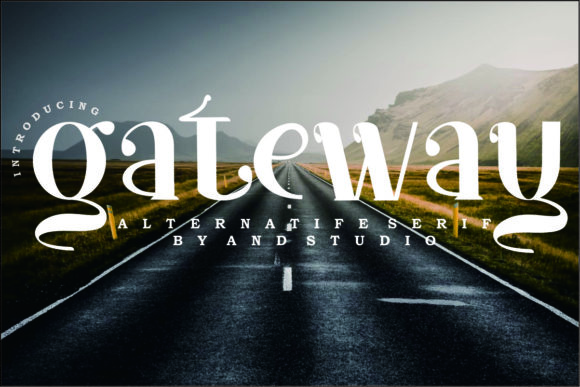
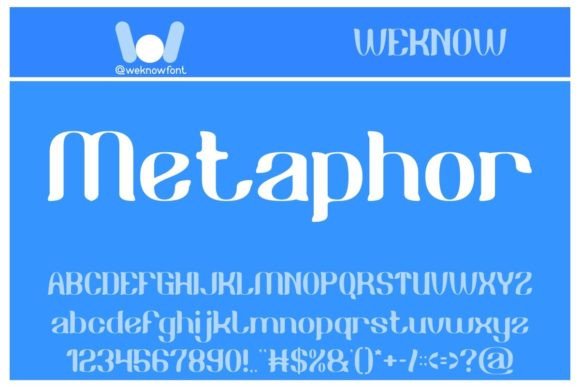
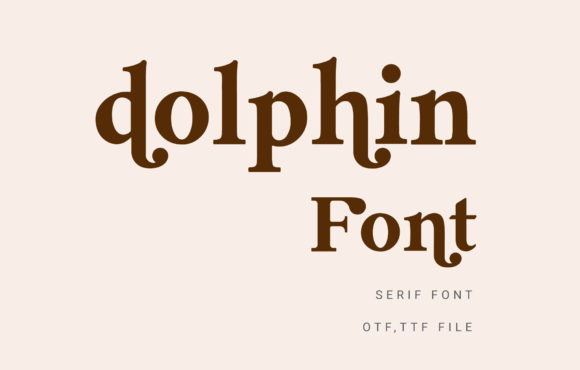
Understanding the visual anatomy of Dolphin helps in utilizing it effectively. It is best categorized as a display font and a serif font. However, unlike traditional serifs that can feel dusty or academic, Dolphin leans into modern typography. The contrast between thick and thin strokes is balanced to ensure it catches the eye without becoming illegible. The "Dolphin" letterforms possess a geometric stability, yet they avoid feeling rigid. There is a rhythmic flow to the text when you type out a paragraph, guiding the reader’s eye naturally from left to right.
The aesthetic appeal of Dolphin lies in its versatility as a creative font. It commands attention in a headline but retains enough structure to be used in short bursts of body text. It bridges the gap between a script font’s expressiveness and a sans serif font’s utility. If you are working on a project that needs to feel trustworthy but not boring, or luxurious but not pretentious, Dolphin fits that specific middle ground perfectly. It is a premium font choice that signals quality to your audience before they even read the words.
Strategic Applications Across Industries
The true test of a typeface is how well it adapts to different mediums. Dolphin excels across a wide range of applications, making it a valuable addition to any designer's toolkit of design assets. Its utility spans from digital screens to physical print products, offering consistency for cross-channel branding.
Branding and Corporate Identity
For logo design and brand identity, Dolphin provides a strong foundation. A logo sets the tone for a business, and using Dolphin suggests a brand that is established and detail-oriented. It works exceptionally well for the apparel industry, where typography needs to look good on hang tags, stitched labels, and storefront signage. Entrepreneurs building a brand identity from scratch can use Dolphin to create a cohesive look. By using Dolphin for the primary logo and headlines, you create an immediate visual anchor. It pairs beautifully with a clean sans serif font for body copy, ensuring the brand looks modern and accessible.
Editorial and Publishing Design
In the world of editorial design, hierarchy is everything. Whether you are designing a magazine, a book, or a comic, the reader needs to know where to look first. Dolphin works as an excellent headline font because it draws attention without shouting. For book covers, particularly in genres like romance, mystery, or lifestyle, the elegant curves of Dolphin add a layer of intrigue. Publishers will find that it holds up well in print, maintaining its crispness even on textured paper stocks. It brings a cinematic quality to layouts, making it a strong candidate for movie posters or music album covers where visual impact is paramount.
Digital and Social Media
The digital space demands clarity and personality. On YouTube thumbnails, Instagram stories, or website headers, Dolphin stands out against busy backgrounds. Because it is a display font, it is optimized for large sizes, ensuring that your text is readable even on small mobile screens when used as a headline. Content creators can use Dolphin to develop a signature style for their social media graphics. Consistency in typography helps build recognition; when your followers see that specific serif style, they know it’s your content. For web design, Dolphin can be used for hero text or pull quotes to break up the monotony of standard web-safe fonts.
Typography and Perception
Typography is psychology in visual form. The fonts we choose influence how an audience perceives a message. Serif fonts like Dolphin are historically associated with authority, tradition, and reliability. However, because Dolphin is a modern typography example, it sheds the stuffiness of the past. It communicates that a brand is forward-thinking but respectful of quality.
When a small business owner chooses Dolphin for their packaging design, they are signaling that their product is premium. It affects the perceived value of the item inside the box. In marketing materials, a creative font like Dolphin can increase engagement. Readers are more likely to stop scrolling if the typography is visually stimulating. It creates a visual hierarchy that makes information digestible. By using Dolphin for key points, you guide the reader to the most important information, improving the overall user experience of your design.
Practical Guidance for Implementation
Choosing a font is only half the battle; implementing it correctly is where the skill lies. Here is how to get the most out of Dolphin in your projects.
- Evaluate the Context: Dolphin is a display font. While it is legible, it is not designed for long-form reading like an entire novel or a dense technical manual. Use it for headlines, sub-headers, and callouts. For the body text, pair it with a highly readable sans serif or a simple serif.
- Master Font Pairing: The best way to highlight Dolphin is to contrast it. If Dolphin is your primary display font, try pairing it with a geometric sans serif for the body. This creates a dynamic tension between the decorative serif and the functional sans serif. Avoid pairing it with other highly stylized script fonts or handwritten fonts, as this can create visual clutter.
- Check the Styles: A premium font often comes with various weights and styles. Review the included styles of Dolphin. Does it have a bold weight for emphasis? Does it have an italic for subtle nuance? Utilizing these variations allows you to create a rich visual hierarchy without introducing new typefaces.
- Test for Readability: Always test Dolphin at the size it will be viewed. A font that looks great on your 27-inch monitor might look different on a printed business card or a mobile phone screen. Ensure the kerning (space between letters) is balanced for your specific text.
- Licensing Matters: If you are using Dolphin for commercial purposes—such as a client's logo, a product for sale, or a monetized YouTube channel—ensure you have the correct commercial font license. Using a commercial font legally protects you and supports the type designers who create these tools.
Creative Freedom with Dolphin
The beauty of a tool like Dolphin is the creative freedom it unlocks. It is suitable for a vast array of projects, from the game industry to the cartoon sector. Imagine a retro-style game title using Dolphin; the sharp edges of the serif would complement pixel art or vector graphics beautifully. Think about a boutique bakery’s branding; Dolphin could evoke a sense of artisanal quality on menus and signage.
For crafters and hobbyists, Dolphin offers a professional touch to personal projects. Whether you are designing invitations, creating digital planners, or making stickers, this font elevates the final product. It moves your work from "homemade" to "handcrafted."
Ultimately, Dolphin is more than just a set of vector paths. It is a design strategy. It helps bridge the gap between a concept and a professional execution. By incorporating this serif font into your workflow, you gain access to a visual language that is both stylish and functional. It empowers you to create designs that resonate, communicate clearly, and look undeniably beautiful. Whether you are a seasoned graphic designer or a business owner taking control of your visual assets, Dolphin provides the style and substance needed to make your work stand out.